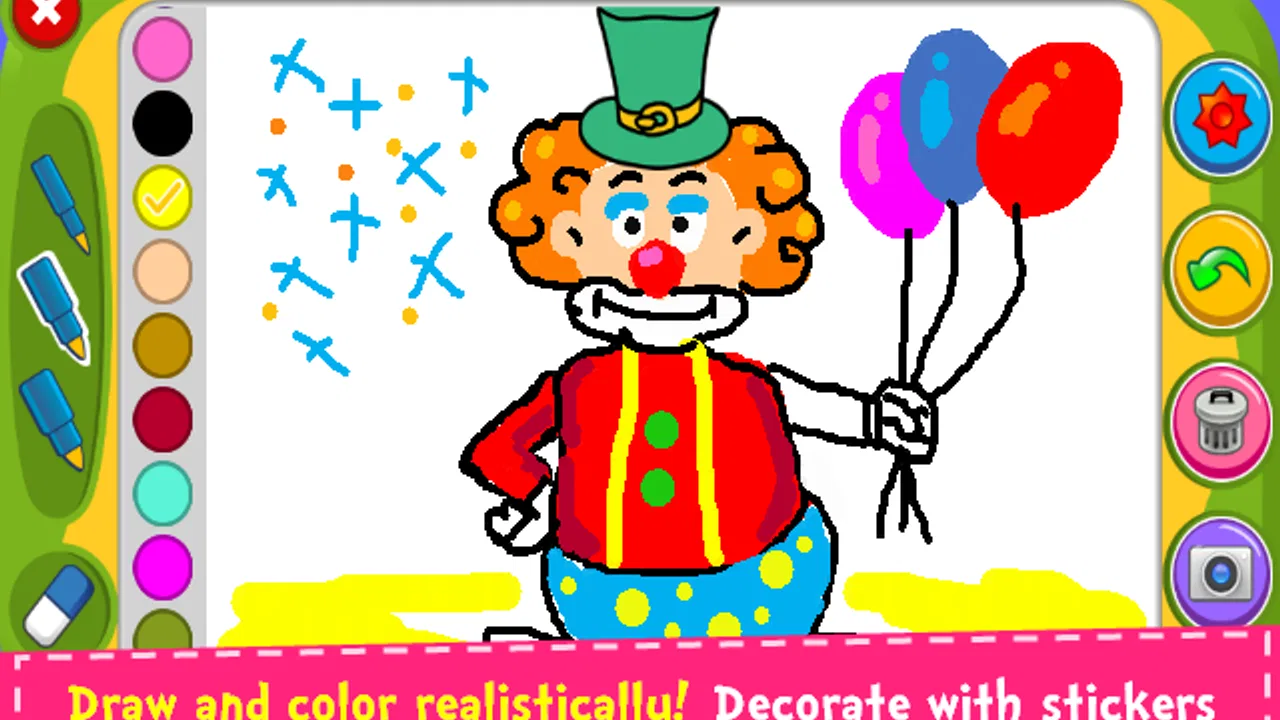
Magic Board - Doodle & Color
- 4.2
- Rating
- 5.00M
- Installs
- Free
- Price

 Analysis by App-foxy
I tested Magic Board - Doodle & Color as the kind of app that is easy to hand to a child for a few quiet minutes, but I found it more useful when treated as a shared drawing space rather than a full creative studio. Its central idea is simple: a chalkboard-style canvas where children can draw and color with a playful, low-pressure feel. That simplicity is its biggest strength, especially on a family device where several people may want to use the same screen without a long setup.
Developed by Orange Studios Games, this free parenting app is aimed at Everyone and works on devices running Android 5.0 or later. It has been available since the end of 2015, and the current version is 1.45. Those details matter less than the practical result: this is an older, lightweight concept that focuses on immediate interaction instead of turning drawing into a complicated project-management task.
My overall impression is positive, with an important qualification. I would recommend it for spontaneous doodling, early coloring practice, and short shared activities. I would not choose it as a replacement for a serious art app, a structured learning platform, or a family system that needs separate profiles and detailed supervision tools.
You May Also Like

 Blood Strike: 2.5 Anniversary
Blood Strike’s Loadouts Turn Every Drop Into a Tactical Gamble
A close look at Blood Strike’s custom loadouts: how fast access to signature weapons reshapes its battle royale rhythm, rewards preparation, and narrows the gap between fights.

 Pandora - Music & Podcasts
Pandora’s Music Is Easy to Start, but Harder to Recover
Pandora’s strength is its low-effort path from a seed to a station. Its weak spot is how much confidence it asks you to place in connection, setup, and quiet recovery.

 8 Ball Pool
 Is Built on Rivalries, Rematches, and Routine
A close look at the rivalries, rematches, shared routines, and unanswered safety questions that turn a quick pool match into a persistent mobile community.

 Samsung Music
’s Quiet Strength Is Playing What You Already Own
Its reach comes less from spectacle than from dependable access to a personal library. That simplicity is both the app’s strongest retention engine and its ceiling.

 AccuWeather: Weather Radar
AccuWeather Review: A Quick, Clear Forecast for Everyday Decisions
For everyday plans, the best forecast is the one you can understand quickly. AccuWeather makes rain timing, radar, and local conditions easy to act on, with a few trade-offs.

 Hill Climb Racing
Why Hill Climb Racing Still Turns Crashes Into One More Run
A tiny car, a bumpy hill and one more upgrade: Hill Climb Racing keeps resurfacing because its simple chaos makes every near-miss feel personal.
More From Our News Desk
View All News


How Magic Board Works on a Shared Family Device
On a shared family device, I’d treat the drawing as a small collaborative activity rather than assume each child has a separate workspace. Before handing over the tablet, I’d agree on whether the next person should add to the picture or begin a fresh turn, so nobody feels their work was taken over. That simple conversation can make a brief doodling session easier to share and sets up a useful question: how can each person contribute without crowding the same canvas?
A quick drawing activity that suits ordinary household moments
The most convincing use case is not a planned art lesson. It is the everyday situation where a child is waiting while dinner is prepared, sitting beside a parent during a short journey, or sharing a tablet with a sibling who has just finished another activity. A chalkboard drawing app makes sense here because the child can begin creating almost immediately, without first learning a large collection of menus.
I also like the fact that the format encourages experimentation. A child can make a rough shape, color over it, or start again without feeling that the result has to become a finished picture. That is different from many polished coloring apps, where the experience is built around selecting a picture and filling predefined areas. Magic Board feels more open-ended, even though the visual idea remains familiar.
For a shared device, that open canvas creates a natural handoff. One child can draw a house, another can add a tree, and an adult can join without needing a separate explanation of the whole interface. The app works best when the goal is participation rather than producing a perfect image.
Why the chalkboard style changes the experience
The chalkboard presentation gives the activity a tactile character. It suggests a classroom board or a reusable sketch surface, which makes ordinary marks feel like part of the design instead of mistakes on a white digital page. In my experience, that visual framing is particularly helpful for children who are more interested in making expressive lines than carefully coloring inside boundaries.
There is also a useful emotional advantage: a chalkboard implies that drawings can be temporary. That can reduce the pressure some children feel when they compare their work with polished illustrations in other apps. If your child tends to abandon creative activities after one imperfect line, this looser setting may be more inviting.
On the other hand, the same simplicity can feel limited to older children. A child who wants layers, detailed brushes, shape tools, text, or more advanced editing will probably outgrow the experience quickly. The app is strongest as a casual drawing surface, not as a digital art workstation.
Setting boundaries before handing over the device
Because this is a shared-use app rather than a household management system, I would prepare the device before giving it to a child. I keep the tablet at a comfortable brightness, close unrelated apps, and decide in advance whether the child is allowed to use the whole device or only this activity. Those steps are not features of Magic Board; they are sensible habits around any child-facing app.
This matters especially when siblings take turns. A drawing session can become confusing if one child expects to continue another child’s picture, or if an adult assumes that a finished sketch will remain available for later. I would explain the handoff clearly: either the next person adds to the same drawing, or the current session ends and the device is returned.
I would also avoid presenting the app as a place to store important artwork unless I had already checked the exact saving and sharing behavior on the particular device. A child may reasonably assume that a picture remains available because it is visible on screen, while the adult may expect a permanent gallery. Treating each session as temporary keeps expectations realistic and prevents disappointment.
Coordinating turns without creating arguments
Magic Board is well suited to a simple turn-taking routine. In my household scenario, I would give each child a defined role: one chooses the subject, one draws the main outline, and one adds color or details. Then the roles rotate. This turns a single canvas into a cooperative activity instead of a contest over who controls the screen.
Another useful approach is to set a shared prompt, such as “make a playground” or “draw an animal that can fly.” The prompt gives the session direction without making it feel like homework. It also helps an adult participate naturally, because I can ask questions about the drawing rather than simply monitoring the child’s screen time.
The trade-off is that a single shared canvas does not automatically create personal boundaries. If one child wants a private drawing and another wants to decorate it, the family needs to agree on that distinction. I would use separate turns for individual work and collaborative turns for group pictures, rather than expecting the app to organize ownership for us.
This is one of the less obvious strengths of a basic drawing tool: it can support conversation better than a highly automated coloring experience. A parent can ask why a certain color was chosen, invite a child to explain a shape, or help turn a scribble into a story. The app supplies the surface; the social value comes from how the household uses it.
Age context and trust
The Everyone content rating makes the app an approachable choice for a broad age range, but that label should not be confused with a complete family-safety assessment. Younger children may still need an adult nearby, particularly when they are using a device that also contains messaging, shopping, video, or personal information. The drawing activity itself is only one part of the device environment.
I would feel comfortable introducing it to a child who understands basic touch gestures and can follow a simple instruction such as “draw here” or “wait for your turn.” For a very young child, the best experience may be joint play with an adult rather than unsupervised access. For an older child, the question is less about safety and more about whether the limited toolset remains interesting.
Trust also includes respecting the child’s creative space. If a child makes a messy drawing, I would resist immediately correcting it or taking over. The app is more valuable when the child can explore marks freely. Adults can help with navigation and device care, but the drawing should remain the child’s work whenever possible.
What the app does better than common alternatives
Compared with a traditional coloring app built around ready-made pictures, Magic Board gives more room for free drawing. That makes it a better fit when the child wants to invent something rather than simply fill spaces. It is also more suitable for a parent and child creating one picture together, because the canvas does not force every participant into a fixed coloring pattern.
Compared with a full-featured art application, however, it is deliberately modest. Advanced apps usually offer more control, but that control can create friction: more buttons, more choices, and more opportunities for a young user to leave the drawing area accidentally. Magic Board’s appeal is that it keeps the creative decision small enough for a child to understand.
It also occupies a different place from educational apps that teach letters, numbers, or guided drawing steps. I would choose those alternatives when I want a defined learning objective. I choose this one when the objective is simply to let a child make something and talk about it.
Practical strengths I noticed during use
One useful workflow is to start with a short verbal plan before touching the screen. Asking a child to name three things to include gives the drawing a purpose and reduces the tendency to tap randomly. Afterward, the child can describe the finished scene. This makes a very simple app support vocabulary, sequencing, and storytelling without pretending to be a formal lesson.
A second tip is to use it as a transition activity rather than a reward that must last indefinitely. A clear beginning and ending work better than leaving the child waiting for an adult to decide when the session is over. I would announce the prompt, allow a turn for each participant, and finish by discussing the picture. That routine is easier to repeat on a shared device.
A third trade-off concerns preservation. If a drawing matters, I would decide before the session how the family will keep it, using only the device’s normal tools and only with adult approval. I would not assume that a chalkboard-style canvas is designed to function like a long-term scrapbook. This small precaution avoids promising a child that a favorite picture will always be there.
A fourth insight is that the app can work well for children who dislike competitive games. There is no need to win, beat a level, or compare a score. The child can focus on the act of making marks. That makes it a calmer alternative during a waiting period, although it may not hold attention as long as a game with goals and rewards.
Where the experience may create friction
The free price is a clear advantage for families who want to try a simple creative activity without committing money. Still, “free” does not automatically mean it will satisfy every household. If your main requirement is a large library of guided projects, precise coloring controls, or a polished portfolio workflow, the basic chalkboard concept may feel too narrow.
The long-running nature of the app is another point to consider. Its release history reaches back to 2015, while the current version is 1.45. That does not by itself determine quality, but it reinforces my impression that this is a straightforward, established-style utility rather than a constantly expanding creative platform. I would choose it for what it does now, not because I expect a deep progression system.
Shared-device use can expose another limitation: the app does not replace family coordination. It will not decide whose turn it is, explain household rules, or separate every child’s work automatically. Those boundaries have to come from the parent. Families looking for individual accounts, detailed activity management, or a controlled multi-child environment should look at a different category of solution.
There is also a mismatch for children who want to develop serious drawing skills. The app can encourage confidence and imagination, but it is not the tool I would use for learning advanced illustration techniques. Once a child starts asking for precision, undo depth, brush customization, or more sophisticated organization, a dedicated art app becomes the better choice.
Who should try it, and who should skip it
I would recommend Magic Board to parents who want a free, accessible drawing activity for a child, especially when the device is shared and the session needs to begin quickly. It suits short creative breaks, collaborative parent-child drawing, and informal storytelling. It is also a sensible option for households that prefer a calm, noncompetitive activity over another game.
I would be more cautious if your child needs a guided curriculum or becomes frustrated by open-ended tasks. Some children enjoy being told what to draw and how to progress; for them, a structured learning app may provide more motivation. I would also skip this one if your priority is a personal art workspace with advanced editing and reliable project organization.
Parents should think about the child’s independence as well. A child who can follow device rules may use it comfortably with occasional check-ins. A toddler or a child using an unfamiliar shared tablet may need an adult beside them. The Everyone rating makes the app broadly approachable, but household supervision still depends on the child, the device, and the surrounding apps.
Performance expectations and everyday fit
Its modest concept makes sense for older Android devices that meet the minimum requirement of Android 5.0. I would still judge the experience on the actual family tablet, because touch response, screen size, and general device condition affect drawing more than the app’s category label. A small screen can make broad gestures feel cramped, while a larger tablet is more comfortable for two people working together.
That shared-screen point is important. One child can easily use a phone-sized display, but collaborative drawing becomes less comfortable when two hands compete for the same small area. For a parent and child, a larger tablet is the better environment. For a quick individual doodle, a phone is more practical, provided the child can hold it safely and follow the family’s device rules.
The app’s audience is reflected in its reach: it has passed five million installs and holds an average rating of 4.2 from roughly seven thousand six hundred ratings. I see those figures as signs that the basic concept has broad appeal, not as proof that every child will enjoy it. A simple drawing surface can be exactly right for one family and uninteresting to another.
My household verdict
After using it with the shared-device mindset, I see Magic Board as a small but useful addition to a family tablet. Its value comes from reducing the distance between “I want to draw” and actually making a picture. The chalkboard presentation supports relaxed experimentation, and the free-drawing format gives it an advantage over coloring apps that only offer fixed illustrations.
I would introduce it with clear boundaries: decide whose turn it is, explain whether the picture is collaborative or personal, and avoid promising permanent storage unless the family has confirmed how it works on the device. Those simple rules make the experience smoother than relying on the app to manage household expectations.
My recommendation is straightforward: choose it for quick, shared creativity, not for advanced digital art or detailed parental management. It is free, broadly age-appropriate, and easy to understand, but its simplicity is both the reason to install it and the reason some families will eventually move on. For a child who wants a low-pressure place to doodle beside a parent or sibling, it earns a place on the device.
With an average of 4.2 and more than five million installs, it has clearly found an audience, and I can understand why. I would keep it available for waiting rooms, quiet afternoons, and cooperative drawing prompts. When the household needs lessons, personal accounts, advanced tools, or stronger organization, I would choose another app. Within its narrower purpose, though, it delivers a pleasant and practical creative break.
FAQs for Magic Board - Doodle & Color
01What is Magic Board - Doodle & Color, and what features does it offer?
Magic Board - Doodle & Color is a creative app designed for both children and adults, offering a range of drawing and coloring tools. Users can create doodles with vibrant colors, use various brush styles, and import images to enhance their artwork. The app also supports layers, allowing for more complex and detailed designs.
02Is Magic Board - Doodle & Color suitable for children?
Yes, Magic Board - Doodle & Color is suitable for children. It has a user-friendly interface and offers parental controls to ensure a safe and enjoyable experience. The app encourages creativity and learning, making it a great educational tool for young artists.
03Does Magic Board - Doodle & Color require an internet connection?
No, Magic Board - Doodle & Color does not require an internet connection to use its core features. However, certain functionalities, like sharing artwork on social media or accessing additional content, may need an internet connection. This makes the app convenient for use on the go.
04Are there any in-app purchases or subscriptions in Magic Board - Doodle & Color?
Magic Board - Doodle & Color offers both free and premium features. While the core drawing tools are available for free, there are optional in-app purchases for additional brushes, colors, and templates. A subscription model may also be available for those who want unlimited access to premium content.
05Can I save and share my creations from Magic Board - Doodle & Color?
Yes, you can easily save your creations to your device's gallery and share them directly from the app. Magic Board - Doodle & Color supports sharing via email, social media platforms, and instant messaging apps, allowing you to showcase your artwork with friends and family.
Pros
- Intuitive interface for easy navigation.
- Wide variety of colors and brushes.
- Supports multi-touch drawing.
- Saves artwork in high resolution.
- Fun for all ages and skill levels.
Cons
- Limited free features without upgrade.
- Occasional ads can be distracting.
- No advanced editing tools available.
- Requires internet for some features.
- Lacks cloud save option for projects.

Magic Board - Doodle & Color
Gallery